Friday, March 2, 2018

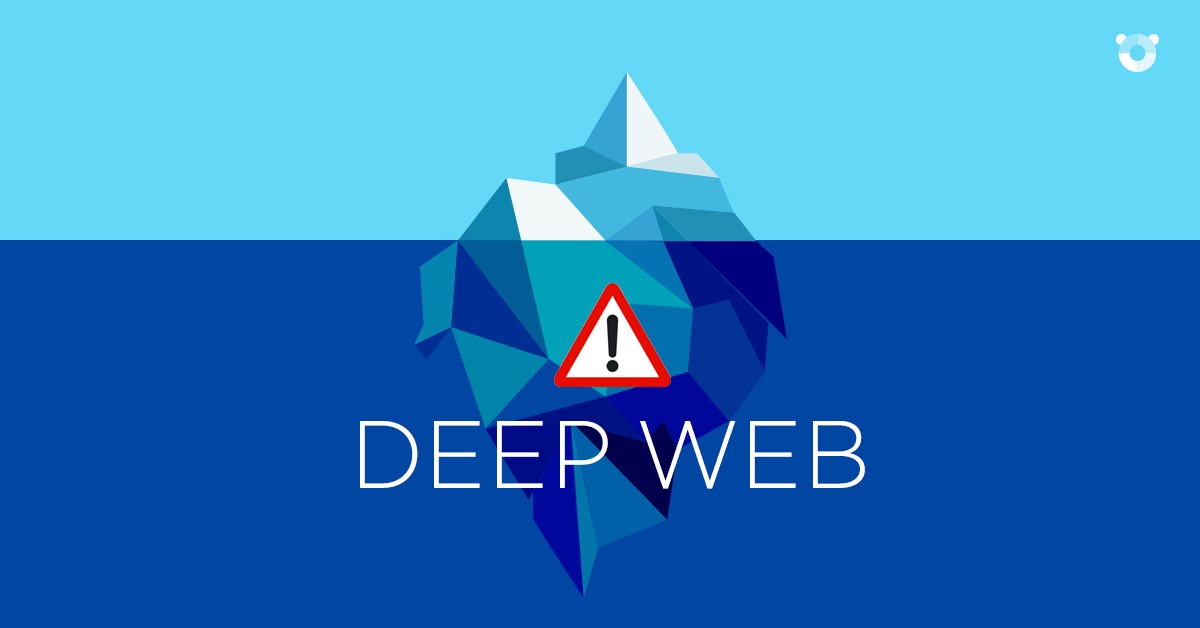
The Deep Web – TOR Network
Résultat de recherche d'images pour "The Deep Web"

“Tor is free software for enabling anonymous communication. The name is derived from an acronym for the original software project name "The Onion Router". Tor directs Internet traffic through a free, worldwide, volunteer overlay network consisting of more than seven thousand relays to conceal a user's location and usage from anyone conducting network surveillance or traffic analysis. Using Tor makes it more difficult to trace Internet activity to the user: this includes "visits to Web sites, online posts, instant messages, and other communication forms". The intent for Tor's use is to protect the personal privacy of its users, as well as their freedom and ability to conduct confidential communication by keeping their Internet activities from being monitored.”

Why Should I use TOR? 

Okay, there are some tutorials that I’m not including here because it’s too seriously illegal in nature. If you connect to a TOR network and access the Deep Web, You’ll learn more not just about android hacking but hacking itself.

Wait, what is Deep web anyway? 

The deep web is the part of the World Wide Web that is not indexed by traditional search engines. Deep Web is only reachable through TOR, This means, you cannot access the deep web with your regular internet connection.

How to connect to TOR and access Deep Web?

1. Install “Orbot” and “Orfox” on Play Store.
2. Open Orbot then Tap on connect.
3. You can now enjoy Deep Web Content using Orfox Browser.

Note: It is possible to configure TOR to use Root access to enable you to access Deep Web using any browser.
Virtual Private Network (VPN)
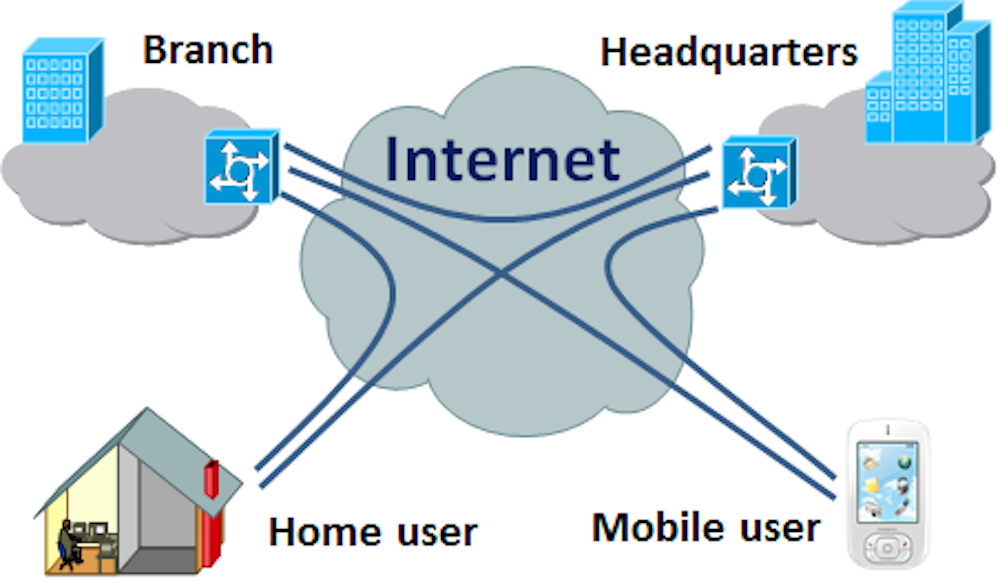
Résultat de recherche d'images pour "Virtual Private Network"

FAIR WARNING: Virtual Private Networks or VPNs might be illegal on your country. On some countries like as Turkey, China, and Iran are blocking Facebook, Twitter, and YouTube and if you are in any of this countries, you may not be able to access your favorite sites. The only way to unblock them is by using VPN. For this Tutorial I recommend using Easy VPN.

NOTE: Some VPN apps gives free Internet access but not for this tutorial. 

Easy VPN installed!

Open Easy VPN and choose the country of your choice or press connect right away. The VPN will fake your device location. You can now enjoy your favorite apps and sites.

What is VPN and how does it work?
 Here’s the complete explanation: 
Source: https://gizmodo.com/5990192/vpns-what-they-do-how-they-work-and-whyyoure-dumb-for-not-using-one

For as ubiquitous as connectivity has become and how reliant we've grown on it, the Internet is still a digital jungle where hackers easily steal sensitive information from the ill-equipped and where the iron-fisted tactics of totalitarian regimes bent on controlling what their subjects can access are common. So instead of mucking around in public networks, just avoid them. Use a VPN instead. Between Wi-Fi spoofing, Honeypot attacks, and Fire sheep, public networks really are cesspools. But if you're working remotely and need to access sensitive data on your company's private servers, doing so from an unsecured public network like a coffee shop Wi-Fi hotspot could put that data, your company's business, and your job at stake.

VPNs, or Virtual Private Networks, allow users to securely access a private network and share data remotely through public networks. Much like a firewall protects your data on your computer, VPNs protect it online. And while a VPN is technically a WAN (Wide Area Network), the front end retains the same functionality, security, and appearance as it would on the private network. 

For this reason, VPNs are hugely popular with corporations as a means of securing sensitive data when connecting remote data centers. These networks are also becoming increasingly common among individual users—and not just torrenters. Because VPNs use a combination of dedicated connections and encryption protocols to generate virtual P2P connections, even if snoopers did manage to siphon off some of the transmitted data, they'd be unable to access it on account of the encryption. What's more, VPNs allow individuals to spoof their physical location—the user's actual IP address is replaced by VPN provider—allowing them to bypass content filters. So, you may live in Tehran but appear to live in Texas, enabling you to slip past the government filters and commit the treasonous act of watching a YouTube video. The horror

Establishing one of these secure connections—say you want to log into your private corporate network remotely—is surprisingly easy. The user first connects to the public internet through an ISP, and then initiates a VPN connection with the company VPN server using client software. And that's it! The client software on the server establishes the secure connection, grants the remote user access to the internal network and— Bing, bang, boom—you're up to your elbows in TPS reports. The horror.

Many security protocols have been developed as VPNs, each offering differing levels of security and features. Among the more common are:

  •  IP security (IPsec): IPsec is often used to secure Internet communications and can operate in two modes. Transport mode only encrypts the data packet message itself while Tunneling mode encrypts the entire data packet. This protocol can also be used in tandem with other protocols to increase their combined level of security.
  •  Layer 2 Tunneling Protocol (L2TP)/IPsec: The L2TP and IPsec protocols combine their best individual features to create a highly secure VPN client. Since L2TP isn't capable of encryption, it instead generates the tunnel while the IPsec protocol handles encryption, channel security, and data integrity checks to ensure all of the packets have arrived and that the channel has not been compromised. 
  •  Secure Sockets Layer (SSL) and Transport Layer Security (TLS): SSL and TLS are used extensively in the security of online retailers and service providers. These protocols operate using a handshake method. As IBM explains, "A HTTPbased SSL connection is always initiated by the client using a URL starting with https:// instead of with http://. At the beginning of an SSL session, an SSL handshake is performed. This handshake produces the cryptographic parameters of the session." These parameters, typically digital certificates, are the means by which the two systems exchange encryption keys, authenticate the session, and create the secure connection. 
  •  Point-to-Point Tunneling Protocol (PPTP): PPTP is a ubiquitous VPN protocol used since the mid-1990s and can be installed on a huge variety of operating systems has been around since the days of Windows 95. But, like L2TP, PPTP doesn't do encryption; it simply tunnels and encapsulates the data packet. Instead, a secondary protocol such as GRE or TCP has to be used as well to handle the encryption. And while the level of security PPTP provides has been eclipsed by new methods, the protocol remains a strong one, albeit not the most secure.
  • Secure Shell (SSH): SSH creates both the VPN tunnel and the encryption that protects it. This allows users to transfer information unsecured data by routing the traffic from remote fileservers through an encrypted channel. The data itself isn't encrypted but the channel it’s moving through is. SSH connections are created by the SSH client, which forwards traffic from a local port one on the remote server. All data between the two ends of the tunnel flow through these specified ports.
 These SSH tunnels are the primary means of subverting the government content filters described earlier. For example, if the filter prohibits access to TCP port 80, which handles HTTP, all user access to the Internet is cut off. However, by using SSH, the user can forward traffic from port 80 to another on the local machine which will still connect to the remote server's port 80. So as long as the remote server allows outgoing connections, the bypass will work. SSH also allows protocols that would otherwise be blocked by the firewall, say those for torrenting, to get past the wall by "wrapping" themselves in the skin of a protocol that the firewall does allow.


To actually create the VPN tunnel, the local machine needs to be running a VPN client. Open VPN is a popular—and free—multi-platform application, as is LogMeIn Hamachi. Windows users also have the option of using the native OS VPN client.

So whether you're a cubicle monkey, file pirate, or just don't want The Man getting all grabby with your personal data, virtual private networks are the best means of securing traffic short of copying it to a flash drive and driving there yourself.


 Web application Cross Site Scripting (XSS)
Résultat de recherche d'images pour "Web application"

even though cross site scripting is more considered as a client or user based attack we did separate it in a dedicated part due to its importance and varieties of exploitation scenarios as we can differentiate three main categories of CSS attacks: 

  •  Echo or reflected attack: in this category the attack depends on the existence of page men to be a convenience but it become a vulnerability due to full or partial reflection of the entered information as is. 
  • Stored Script attack: this category covers the attacks based on the attacker being able to store contents on the server side without being sanitized that will be available to other users. 
  •  Data Object Model attack: The attacker in this category depends on the updating the Data Object Model of the document to cause change on the page not on the reflection of information through the server. 

  Echo or reflection based XSS


Attack requirement:

A. The user access a page that contains a vulnerable page with echo
B. No sanitization is applied on the reflected input passed to that page

Attack process:

A. The attacker creates a link to the trusted site containing the vulnerable echo page passing the JavaScript as parameter.
B. The server will send the response containing the inserted script.
C. The client executes the JavaScript and containing any special message or forwarding request to phished site or simply send back session information which will help the attacker in initiating a session hijacking. 

Example:
A. The attacker creates an email containing a link as follow: 

<a href=”http://theTrustedVulnerableSite.com /echoPage.php?message=” >Visit page

B. The echo page will generate the page containing the script, the script will be executed and show the alert.in real life example the payload script can be s script that sends session cookie information automatically to attacker. 


Web application Authentication methods
Résultat de recherche d'images pour "Web application Authentication methods"

Authentication as mentioned earlier is the process or action of proving or showing something to be true, genuine, or valid Authentication in web application is done through different methods the most common are:

  •  HTML Form based authentication: this is the most common method to apply authentication in a web application. The used credentials are mostly the user name and a password but sometimes in critical application extra credentials are applied like the usage of special pin code or a key generate by one time password device. 
  •  Other methods might be depending on HTTP based basic or digest authentication where HTTP basic sends credentials encoded unencrypted with base64 encoding in time where digest method uses hash function to encrypt credentials and nonce value from the server this is why basic HTTP authentication should be used only if the channel is secure with   (Https). Those methods is usually used on local networks not on the internet.
  • Client SSL certificate with or without a smart card but this can represent a distribution problem 
  •  Some application uses Windows-integrated authentication using NTLM or Kerberos and authentication services like windows passport.  

Attack bad passwords

Not having a special password complexity enforcement functionality can make attacking through the password very easy as many password are predictable or could be a common dictionary word or even empty or has the same username value.
 Some users tend to leave the default or preconfigured password which makes the attack much easier.

Attack requirement:

 Week or no password

Attack Process

a- Try empty and default values for password.
b- Try common dictionary password.
c- If you own an account or self registered try short passwords, user name like passwords to check if that is permitted to disclose the password rules 

Brute force attack

Leaving login process to be repeated unconditionally will make authentication vulnerable to brute force attack which will end in braking authentication with the speed that a penetration system can iteratively try different possible passwords.

Attack requirement:

A. No or client side only check for number of login fails.
B. Not very gonium powerful password.
C. If a self-registering account Is available better to create an account. 
 

Attack process: 

A. Before going directly to automate the attack explore the locking policy manually beginning by trying at least (10) bad password values on the same account, check any messages and accessibility of the account with the right password. 
B. If the account was locked, try to monitor any cookie to discover it the locking is based on client side information that you can manipulate. 
C. See if the system allows you to login with right user name and password, if yes you can keep guessing. 
D. Monitor to find any difference in response between bad login and successful one to depend on when start in automated phase. A Burp comparer tool can provide a good way to do that  
E. Use an automation tool to iteratively try different user names and password. (Burp is an example) 
F. Monitor results and collect broken account information. 
G. Different messages can be a very good pointer that you did a bad guess the user name only or both credentials. 
Attack Execution the client

Image associée


1 Attack the client

If the mapping and analysis level showed flaws on the client side it will be a good idea to begin there. The client (browser) is easily reachable by attacker and can be compromise and manipulated to initiate a full attack or partial attack as base for other types of attacks.
Due to the many types of possible client attacks the coming parts will explain some possible attack execution scenario on client and examples about each type.

2 Two types of attacks  

  No matter what technologies are used in attacking client side, all attacks will take one of two main types: Exploits and Trickery. 
In Exploit attacks a malicious code is executed on the client side and its host due to resident vulnerability and of course the countermeasure can simply be getting rid of that exploited vulnerability, from the other hand the trickery attacks are based on behavior of human operator after getting seduced by an attractive message or offer to make action that disclose important information or be used to access the information or allow the attacker to install a software that can be used later to extract data from client machine

3 Flash Cookies (LSO)


Flash uses what is called Flash Cookies for client-side storage which Is a text file with the extension (.lso) being able to access and manipulate this file will give the ability to change the behavior of the flash object.

Attack requirement:
A. Being able to access the LSO file
B. No validation for data retrieved from the LSO files stored on the client. 

Attack process
A. Access the LSO file.
B. Use the LSO editor to change an invalidated value that might give higher
privileges 

Example: 
This example will allow the attacker to get higher discount rate on a purchase done through a flash object.   

A. Locate the LSO file.
B. Use LSO editor to change the discount value
C. As soon as the flash object retrieve the local storage from the lso file it will apply the new discount rate if no validation where done by the server. 


Other source of public information
Résultat de recherche d'images pour "‫عملية ااختراق‬‎"

Many information that you can benefit from are available publicly about the functionality and content outside the website those information can be reached through search engines and cached copies , a post on development forum or using web archives like the one exist on www.archive.org To be able to use search engines effectively try to use the special search features like the following that can be namely used with google:

Site: www.theExploredSite which return all references indexed by google. Site: www.theExploredSite login that returns all pages containing login Link: www.theExploredSite returns all pages on other websites that has link to that specific site. 

Related: www.theExploredSite returns similar web pages.

 Another valuable source of information is special purpose search engines that embed some intelligence dedicated to retrieve a specific type of information. Melissa Data can help you freely gather information on people associated with a target web application this kind of information sometimes hold higher level of importance to the attacker than technical information.to enrich the retrieved result using an open source tool like Maltego can be irresistible, where Maltego helps visualize the relationships among people, organizations, web sites, Internet infrastructure can aid in information gathering, and it can find affiliations between components within an organization. Even with information as simple as a domain name or an IP address, it can query publicly available records to discover connections.   

Use web server vulnerabilities:

 Lot of software used frequently on web server are deployed with default configuration, folder structure and file locations which makes it good place to dig for some information. Brute force approach is also used in checking vulnerabilities in known set of third party application and web server modules.an example about a good tool for that purpose is WIKTO

Mapping parameters:

 Parameters can be mapped sometimes directly if it was sent through query string like in: http://myWebSite/addUser.php?name=sami&mobile=0987655441 If application is using URLs after rewriting parameters as part of the slash separated string a trial to change or remove values should take place with assessment of generated response. For hidden parameters guessing is the only way as example the assessment of the existence of (debug) parameters that helps developer to test pages and bypass the authentication process.  

Documenting your findings:


When trying to map and profile the application you will get a lot of information specially if you are using multiple tools and approaches, organizing your results and deciding which are relevant is very important in order to be able to analyses that information later on. Using matrix and charts can be very helpful..

Also the usage of diagrams that represent the web site is essential to understand different functionalities.it is also preferable to give different color to static and dynamic pages where static pages are those pages that does not involve and server side executable contents like files with html extension. Include the diagram the structure of web site with available passed parameters Other Information that should be documented in addition to pages’ information are Directory structure, common file extension, any content based on plugin like flash or silver lite or java virtual machine like applet, common cookies and query string and parameters.